
Auto Booking
Enable automatic booking of Stripe payouts to QuickBooks.
What is Auto Booking?
Auto Booking is a feature that automatically creates journal entries in QuickBooks whenever Stripe processes a payout to your bank account. When enabled, SyncFast monitors your Stripe account for new payouts and books them to your QuickBooks accounts without requiring manual intervention.
How to Enable Auto Booking
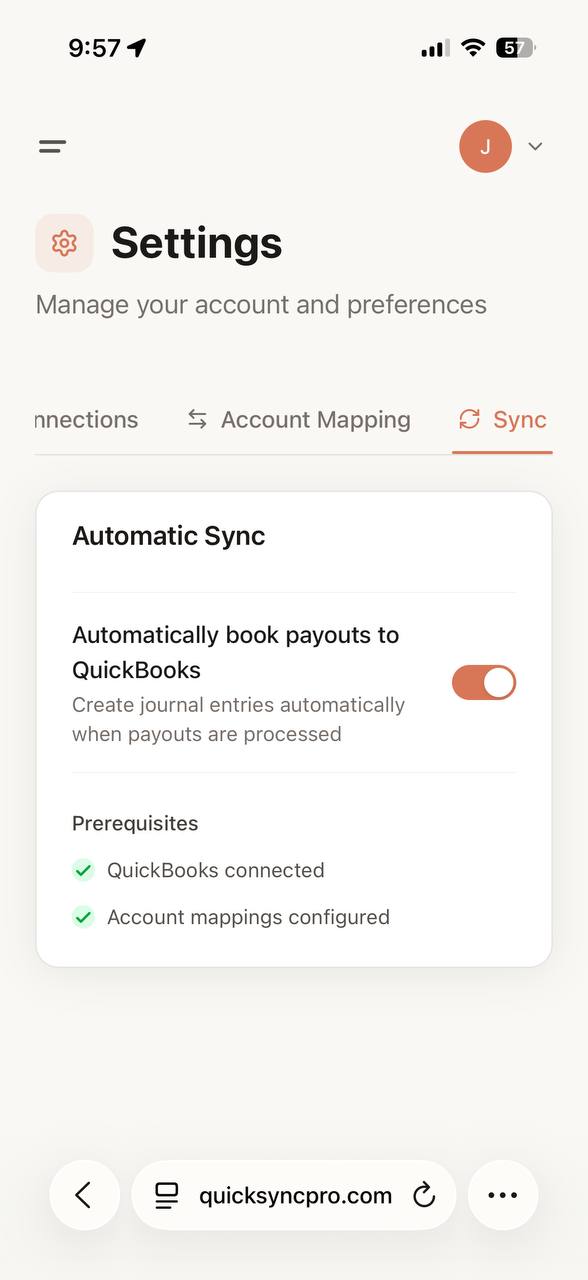
To enable automatic payout booking:
- Go to Settings in your dashboard
- Click on the Sync tab
- Toggle Automatically book payouts to QuickBooks to ON
Prerequisites
Before you can enable Auto Booking, you must have:
- ✅ QuickBooks connected — Your QuickBooks account must be linked to SyncFast
- ✅ Account mappings configured — You need to map your Stripe transaction types to the appropriate QuickBooks accounts
See Account Mapping for details on setting up your account mappings.
What Happens When Auto Booking is Enabled?
Once Auto Booking is turned on:
- SyncFast continuously monitors your Stripe account for new payouts
- When a payout is detected, the system automatically:
- Retrieves all transactions included in the payout
- Categorizes them according to your account mappings
- Creates a balanced journal entry in QuickBooks
- Records fees, refunds, and revenue separately
Manual Booking Option
If you prefer to review payouts before booking them, you can leave Auto Booking disabled. In this mode:
- Payouts will appear in your dashboard as "Ready to Book"
- You can review the breakdown of each payout
- Click Book to QuickBooks to manually create the journal entry when you're ready
Disabling Auto Booking
You can turn off Auto Booking at any time by toggling the switch OFF. When disabled:
- No new payouts will be automatically booked
- Previously booked transactions remain in QuickBooks
- You can still manually book payouts from your dashboard